

Tuesday, February 13, 2007
Friday, January 12, 2007
University Accommodation Network Design
I have been in the process of designing the network topology and enacting it within a Mikrotik RouterOS 2.9.38 configuration. It has been an interesting exercise since its not everyday you get to design a new Internet access system around a quality physical infrastructure.
The Universityhas a Cisco switched network throughout the on-campus student accommodation campuses. This entails Catalyst 29xx and 3550 switches running VLANs and trunked into a route/switched core network.
Particulars about the environment:
This will give the guests an option of using the Hotspot or the PPPoE service to connect. I would expect most will use the Hotspot given its simplicity however there will be the power user who will want to run a 24x7 connection using a broadband router, possibly wishing to have a public IP to run other services.
Update:
I have modified the plan and I will now use three servers - one per campus. The main reason for this is to simplify the configuration on each of the servers and provide better resources to each campus. The VLANs will still be in place however I will still need to use a bridge on each to combine the two to offer both a hotspot and a PPPoE service too. Running both a Hotspot and a PPPoE service on the one interface is generally frowned upon - I will investigate the inclusion of a single PPPoE server that services all three campuses.
Network Topology including services Revision 5:

Network Topology including services Revision 2:

Network Topology including services Revision 1:

The Universityhas a Cisco switched network throughout the on-campus student accommodation campuses. This entails Catalyst 29xx and 3550 switches running VLANs and trunked into a route/switched core network.
Particulars about the environment:
- 100Mbit to each room, 1Gbit between campuses
- Each campus has approximately 300 units - a total of 950 units
- There are two VLANs per campus
This will give the guests an option of using the Hotspot or the PPPoE service to connect. I would expect most will use the Hotspot given its simplicity however there will be the power user who will want to run a 24x7 connection using a broadband router, possibly wishing to have a public IP to run other services.
Update:
I have modified the plan and I will now use three servers - one per campus. The main reason for this is to simplify the configuration on each of the servers and provide better resources to each campus. The VLANs will still be in place however I will still need to use a bridge on each to combine the two to offer both a hotspot and a PPPoE service too. Running both a Hotspot and a PPPoE service on the one interface is generally frowned upon - I will investigate the inclusion of a single PPPoE server that services all three campuses.
Network Topology including services Revision 5:

Network Topology including services Revision 2:

Network Topology including services Revision 1:

Friday, January 05, 2007
Nifty WiFi Configuration for RouterOS 2.9.38
An unusual situation prompted me to create a rather elaborate WDS configuration between three APs. Originally it was meant to be a simple AP with two clients, the clients would be configured as wireless bridges using WDS. However one of the two clients ended up not having good line of site back to the AP, so I had to get creative and create another WDS link that bounces of the other client, while preserving the important services...
Each AP/Client has three interfaces - 1 Ethernet, 1 CM9 and 1 SR5. Originally the SR5's where meant to connect to each other (AP/Clients) and the CM9's were there for backup/hotspot access. The Ethernet ports connect to the LAN/PPPoE network at each client site.
Basically I created a Virtual AP on the "Varsity" hotspot interface and turned on WDS, made it so that it adds WDS interfaces to the 'Backbone' bridge, which is shared with the ethernet and SR5 interfaces. This way the normal Hotspot AP can continue to function as normal although the interface will be under extra load.
Then on "The Village" hotspot interface I set its primary role to 'station wds' and created a VirtualAP to run its hotspot onto. This allows me to maintain the hotspot on this interface.
However the direct link back to the AP worked fine, so the link between the two clients was set up on STP for auto-failover.

Topology:

Each AP/Client has three interfaces - 1 Ethernet, 1 CM9 and 1 SR5. Originally the SR5's where meant to connect to each other (AP/Clients) and the CM9's were there for backup/hotspot access. The Ethernet ports connect to the LAN/PPPoE network at each client site.
Basically I created a Virtual AP on the "Varsity" hotspot interface and turned on WDS, made it so that it adds WDS interfaces to the 'Backbone' bridge, which is shared with the ethernet and SR5 interfaces. This way the normal Hotspot AP can continue to function as normal although the interface will be under extra load.
Then on "The Village" hotspot interface I set its primary role to 'station wds' and created a VirtualAP to run its hotspot onto. This allows me to maintain the hotspot on this interface.
However the direct link back to the AP worked fine, so the link between the two clients was set up on STP for auto-failover.

Topology:

Tuesday, December 12, 2006


Friday, December 08, 2006
The end of year is meant to wind down, not up!
Reaching record number of calls and faults and all in addition to excessive amount of work and controversy.
A number of AccessEzy sites are supplied by RedMedia DSL connections, the typical 1.5Mbit style ones. These have been up and down over the past two days for more than 12hrs at a time thanks to a extremely poor planned and executed changeover of hosting facilities by RedMedia. So you can think of 31 sites down with multiple customers per site all raging at us.
In addition to that turmoil there's this ongoing issue with one of our oldest student accommodation sites. We have been supplying students in-room Internet access at Unicentral for quite sometime. We have always fought to reduce prices and efforts to make things easier for the students, the on-site management and us. We have even lasted through 4 changes of management...
Now the current management wish to ditch us outright in exchange for a new wireless carrier that has recently grown a presence in the area. They seem to think all the infrastructure belongs to the body corporate when in fact it was installed and paid for by us... I'm leaving it to the legals before flexing my technical powers to reduce them to nothing.
On a positive note I have been dealing with the Curtin University in organising the take over of their Student Accommodation Internet services. Everything seems good - they already have a top quality infrastructure in place (Cisco 2950 and 3550 series switches), 100Mbit to each room and its all managed by the Uni. I simply have to install an access controller and they do the rest. Of course I need to organise the backhaul internet feed and backend management software/hardware, but this is looking a lot more easier than micro-managing the site itself.
Got to do a plan to set up wifi in a hotel in Adelaide and inspect a new site in Noosa. Plus do a site revision at another inherited site in Mooloolaba :/ I go on holidays soon too :(
A number of AccessEzy sites are supplied by RedMedia DSL connections, the typical 1.5Mbit style ones. These have been up and down over the past two days for more than 12hrs at a time thanks to a extremely poor planned and executed changeover of hosting facilities by RedMedia. So you can think of 31 sites down with multiple customers per site all raging at us.
In addition to that turmoil there's this ongoing issue with one of our oldest student accommodation sites. We have been supplying students in-room Internet access at Unicentral for quite sometime. We have always fought to reduce prices and efforts to make things easier for the students, the on-site management and us. We have even lasted through 4 changes of management...
Now the current management wish to ditch us outright in exchange for a new wireless carrier that has recently grown a presence in the area. They seem to think all the infrastructure belongs to the body corporate when in fact it was installed and paid for by us... I'm leaving it to the legals before flexing my technical powers to reduce them to nothing.
On a positive note I have been dealing with the Curtin University in organising the take over of their Student Accommodation Internet services. Everything seems good - they already have a top quality infrastructure in place (Cisco 2950 and 3550 series switches), 100Mbit to each room and its all managed by the Uni. I simply have to install an access controller and they do the rest. Of course I need to organise the backhaul internet feed and backend management software/hardware, but this is looking a lot more easier than micro-managing the site itself.
Got to do a plan to set up wifi in a hotel in Adelaide and inspect a new site in Noosa. Plus do a site revision at another inherited site in Mooloolaba :/ I go on holidays soon too :(
Monday, November 27, 2006
AccessPlus Captive Portal User Interface
The following are screen shots of my Hotspot User Interface:
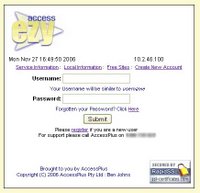
UserLogin: The first screen presented to the user when they connect and attempt to go to a website (their session is hijacked by the Access Controller).
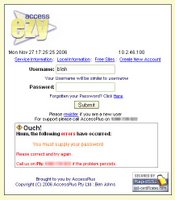
ErrorGeneration: Errors are generated on a per screen basis.
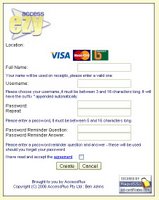
CreateUser: Since the new user does not have an account yet, they can click on 'Create User' and make their own account.
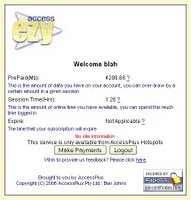
UserStatus: Once a user has logged in, or has created a new account they will be presented with a screen that shows the status of their account. The image provided here shows a "transient" account that has 1.26Hrs of Session Time and almost 4.3Gb of data remaining. A new user will have zero values, and a "subscriber" will have an expiry date instead. A voucher user will have both a Session Time and a Expiry date.
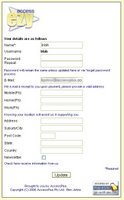
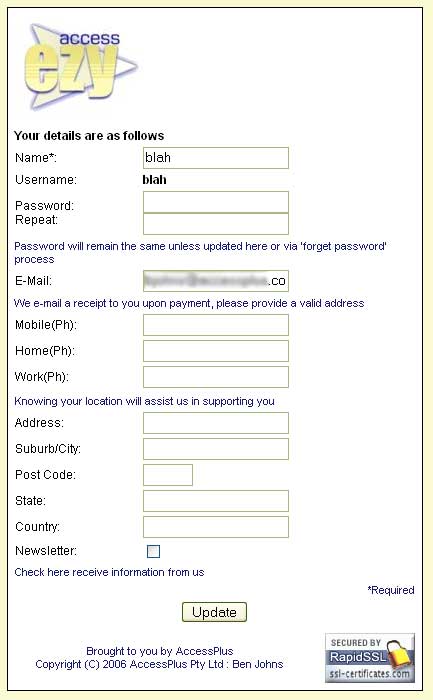
UserInfo: Optional user information and be viewed and edited by the user via the UserInfo screen. This is mostly used for subscriber/longer term accounts.
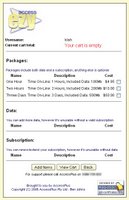
ProductList: This screen lists the available products for the given location. These are separated into categories; Packages are a combination of Data/Time, Data is just that, and Subscription is time. So they can purchase a combination or pick and choose their own.
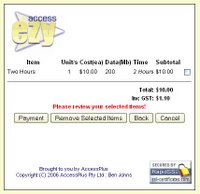
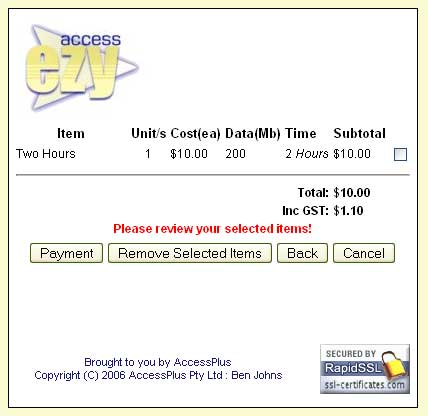
CartList: Selected products are added to the users cart.
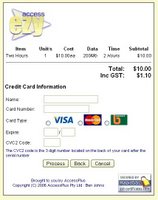
Payment: Once a user has completed selecting various products and updating their cart, they will then 'checkout' using the payment screen.
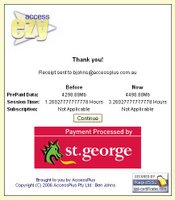
PostPayment: After a successful payment they are presented with a before and now summary screen.
Other features:
Receipts are e-mailed (will allow users to generate copies)
Purchase history is kept (will eventually allow users to browse this information)
Usage History is kept (will allow users access soon)
Various processes etc are logged on the server
Multi-Location support (with custom templates/pricing plans etc)
Currently Compatible with Mikrotik RouterOS and Colubris MSCs
Supports Multiple Payment Gateways
Supports Roaming Users with opt-in/opt-out location support
Various other features not listed.
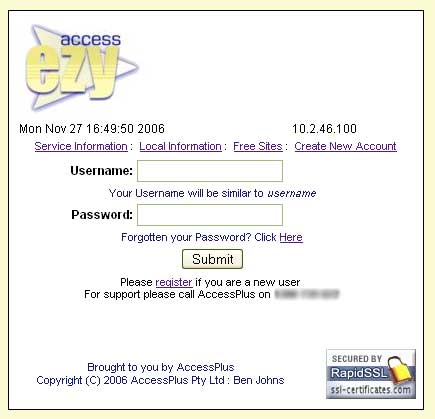
UserLogin: The first screen presented to the user when they connect and attempt to go to a website (their session is hijacked by the Access Controller).
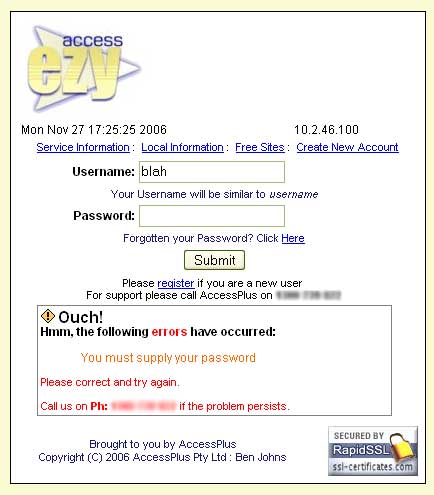
ErrorGeneration: Errors are generated on a per screen basis.
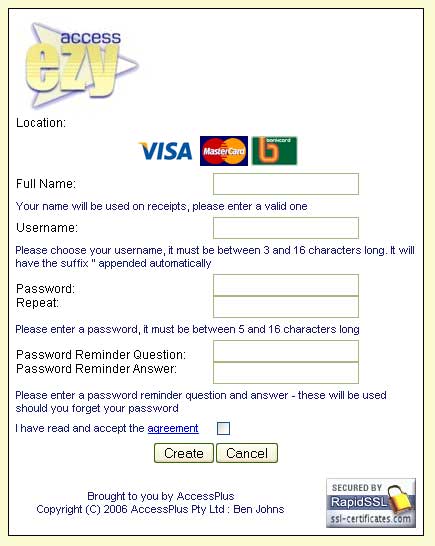
CreateUser: Since the new user does not have an account yet, they can click on 'Create User' and make their own account.

UserStatus: Once a user has logged in, or has created a new account they will be presented with a screen that shows the status of their account. The image provided here shows a "transient" account that has 1.26Hrs of Session Time and almost 4.3Gb of data remaining. A new user will have zero values, and a "subscriber" will have an expiry date instead. A voucher user will have both a Session Time and a Expiry date.
UserInfo: Optional user information and be viewed and edited by the user via the UserInfo screen. This is mostly used for subscriber/longer term accounts.

ProductList: This screen lists the available products for the given location. These are separated into categories; Packages are a combination of Data/Time, Data is just that, and Subscription is time. So they can purchase a combination or pick and choose their own.
CartList: Selected products are added to the users cart.

Payment: Once a user has completed selecting various products and updating their cart, they will then 'checkout' using the payment screen.

PostPayment: After a successful payment they are presented with a before and now summary screen.
Other features:
Receipts are e-mailed (will allow users to generate copies)
Purchase history is kept (will eventually allow users to browse this information)
Usage History is kept (will allow users access soon)
Various processes etc are logged on the server
Multi-Location support (with custom templates/pricing plans etc)
Currently Compatible with Mikrotik RouterOS and Colubris MSCs
Supports Multiple Payment Gateways
Supports Roaming Users with opt-in/opt-out location support
Various other features not listed.
Thursday, November 16, 2006
Another hotspot
A new hotspot is now located on top of the Sirocco building, Mooloolaba. It is simply tacked onto a 2.4GHz to 5.8GHz wireless bridge - had a spare wireless interface so I decided to use it.
It is currently attached to a 15dBi Yagi antenna pointing west. This should offer coverage to the new buildings located on the 'mountain view' side of the Sirocco building. I will look at replacing this antenna with a 180° sector with a down tilt bracket.
While this hotspot is running the same system as the various Maroochy hotspots I have in place, it wasn't requested by the Maroochy Shire Council. I will change it over to an alternative interface as soon as I've completed all the changes.
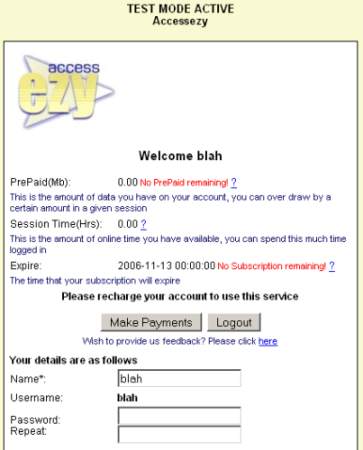
I have been slowly revamping my hotspot user interface. It's okay, but I can see that it needs a considerable amount of improvement and I should be making it a lot more modular. I guess I'm just trying to get something that works out into production first and then work on re-writing large chunks of code into reusable modules. I should also be rolling it up into a nice installer...
It is currently attached to a 15dBi Yagi antenna pointing west. This should offer coverage to the new buildings located on the 'mountain view' side of the Sirocco building. I will look at replacing this antenna with a 180° sector with a down tilt bracket.
While this hotspot is running the same system as the various Maroochy hotspots I have in place, it wasn't requested by the Maroochy Shire Council. I will change it over to an alternative interface as soon as I've completed all the changes.
I have been slowly revamping my hotspot user interface. It's okay, but I can see that it needs a considerable amount of improvement and I should be making it a lot more modular. I guess I'm just trying to get something that works out into production first and then work on re-writing large chunks of code into reusable modules. I should also be rolling it up into a nice installer...
Subscribe to:
Posts (Atom)